Community Story
Samuel Soh, then Digital Consultant and CDE Technical Lead, and Mariano Amoedo, Digital Consultant and Project CDE Optimisation Lead at Mott MacDonald
Mott MacDonald scaled information delivery planning without automating every step
Mott MacDonald moved a plan for more than 10,000 expected deliverables from Excel into connected Morta tables. Shared document numbers linked planning with SharePoint and Aconex status, while reviewers retained control of submission.
Mott MacDonald · March 2024
A new design phase meant more than 10,000 expected deliverables for a Mott MacDonald subway extension project in North America. Excel had served the team in early design, but the next phase needed greater control. Moving the plan into Morta also required a change in working habits. Teams initially kept sending spreadsheets for someone else to enter.
Executive summary
Mott MacDonald moved the project’s information delivery plan into structured Morta tables, connecting planned deliverables with SharePoint working files and Aconex status through shared document numbers. Designers and reviewers could see delivery status beside each planned item, while a Power BI dashboard became a daily reporting resource for more than 500 viewers across over 30 design disciplines. Weekly training, feature feedback and activity reporting supported the move into the plan. Reviewers selected deliverables for manual submission to document control, while Aconex status returned automatically without duplicate entry. Samuel compared master information delivery plan (MIDP) setup in months previously with weeks on the pilot. In March 2024, the team was still developing its reusable template and quantifying the benefits.
Evidence at a glance
- More than 10,000 deliverables were expected in the project’s next design phase.
- More than 500 viewers used the embedded Power BI dashboard, according to Mariano.
- Over 30 design disciplines were represented in that audience.
- MIDP setup moved from months to weeks in Samuel’s comparison of earlier projects with the pilot.
Speak to them, understand their concerns, and always respond to their feedback as you roll out Morta on your projects.
Samuel Soh
The results
Delivery status beside each deliverable
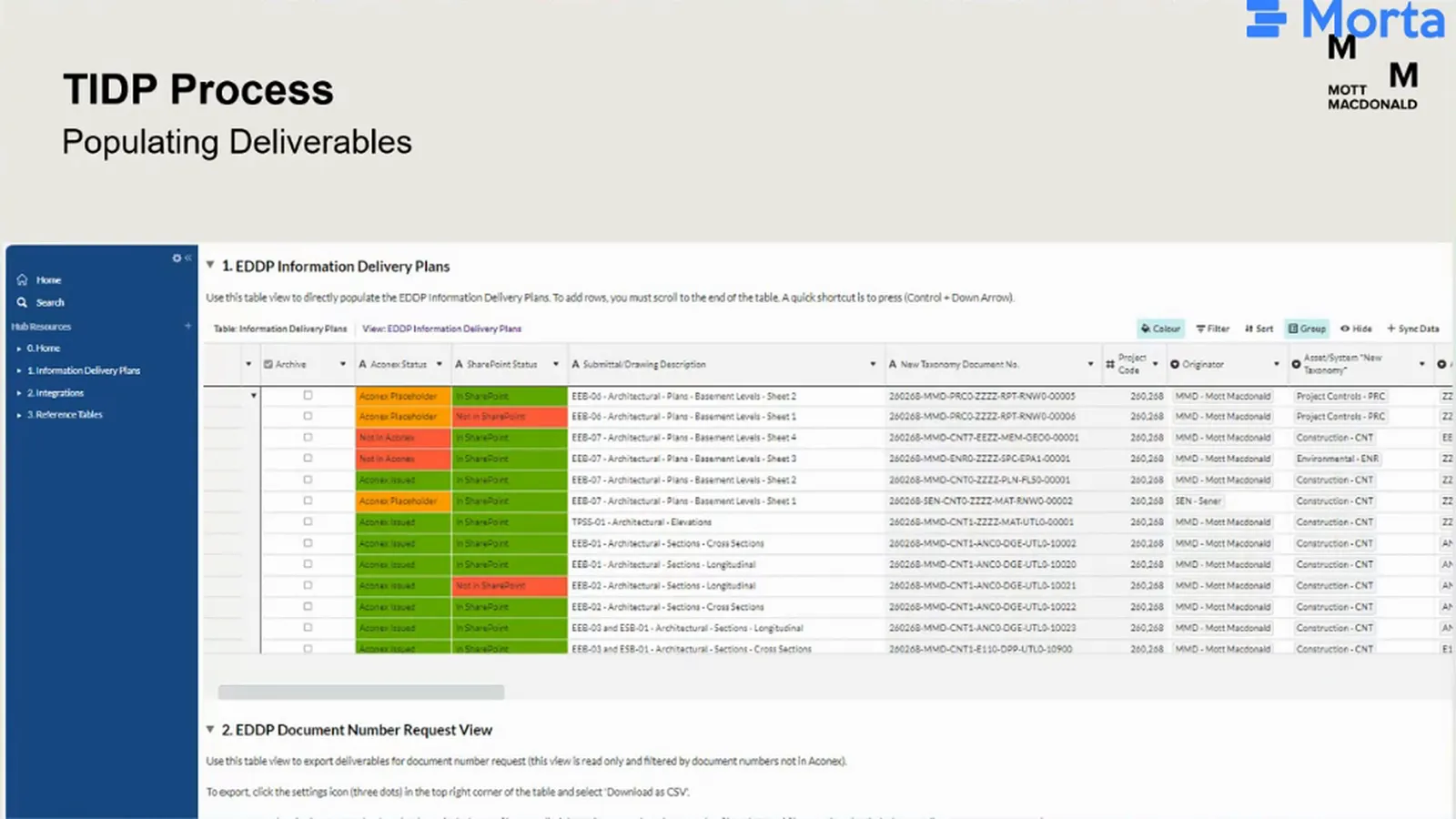
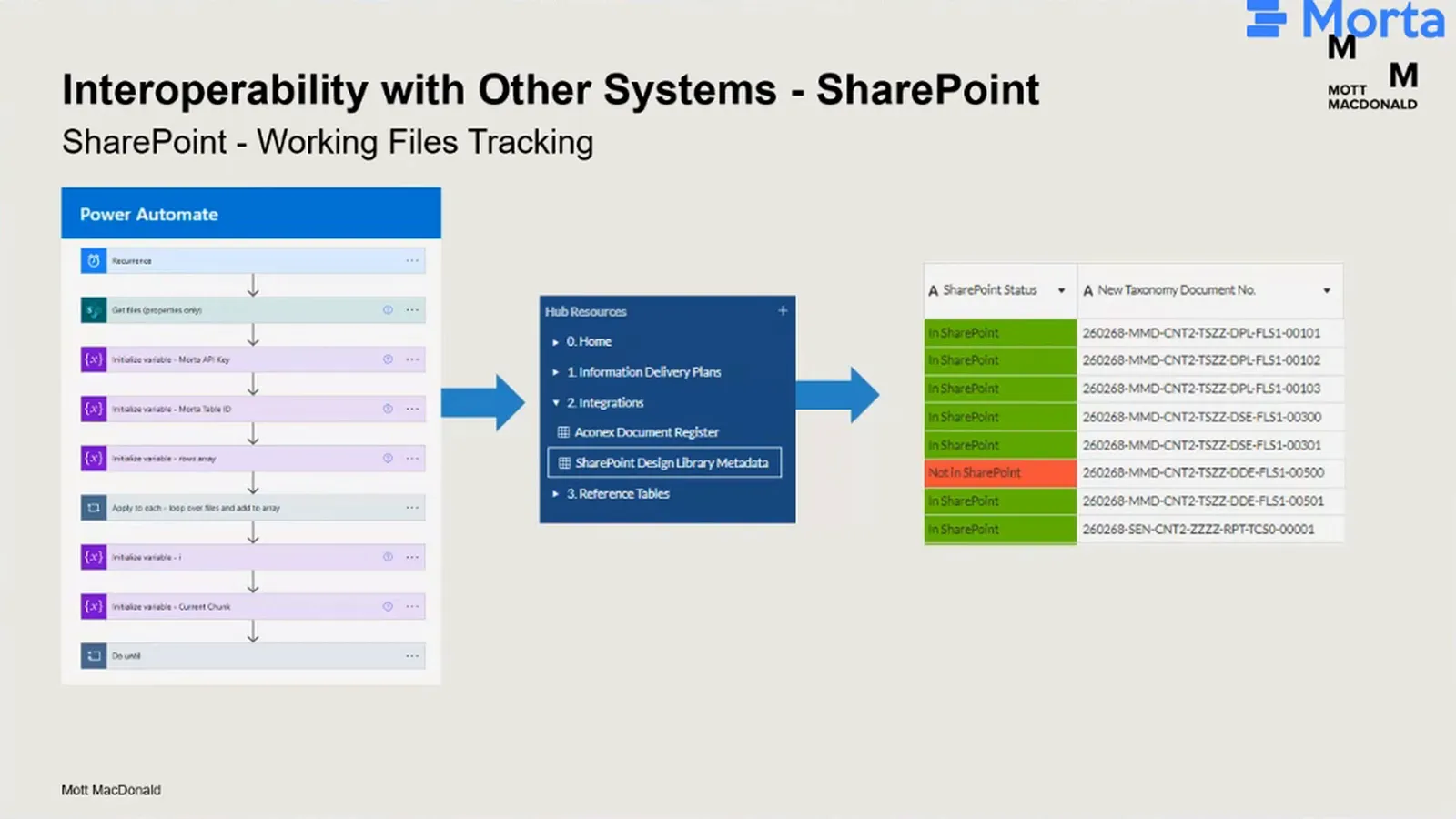
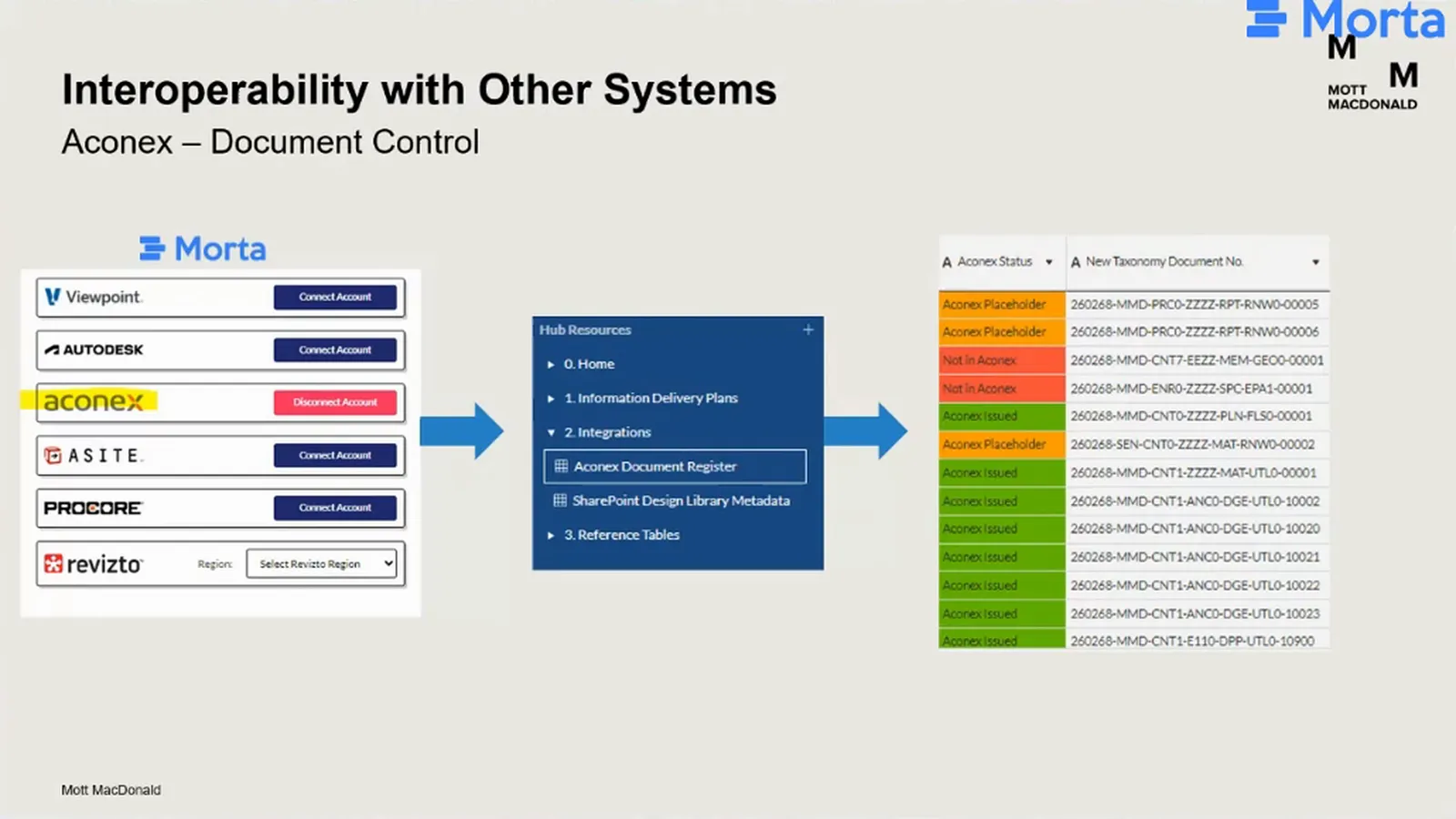
The project team could check two different kinds of progress from the plan: whether a working file existed in SharePoint, and whether its document number had been reserved or its document issued in Aconex. Morta generated document numbers from fields such as originator, document type, discipline and work package. Those numbers connected planned deliverables to the records in each system, placing their status beside the work being planned.
Reporting across the design disciplines
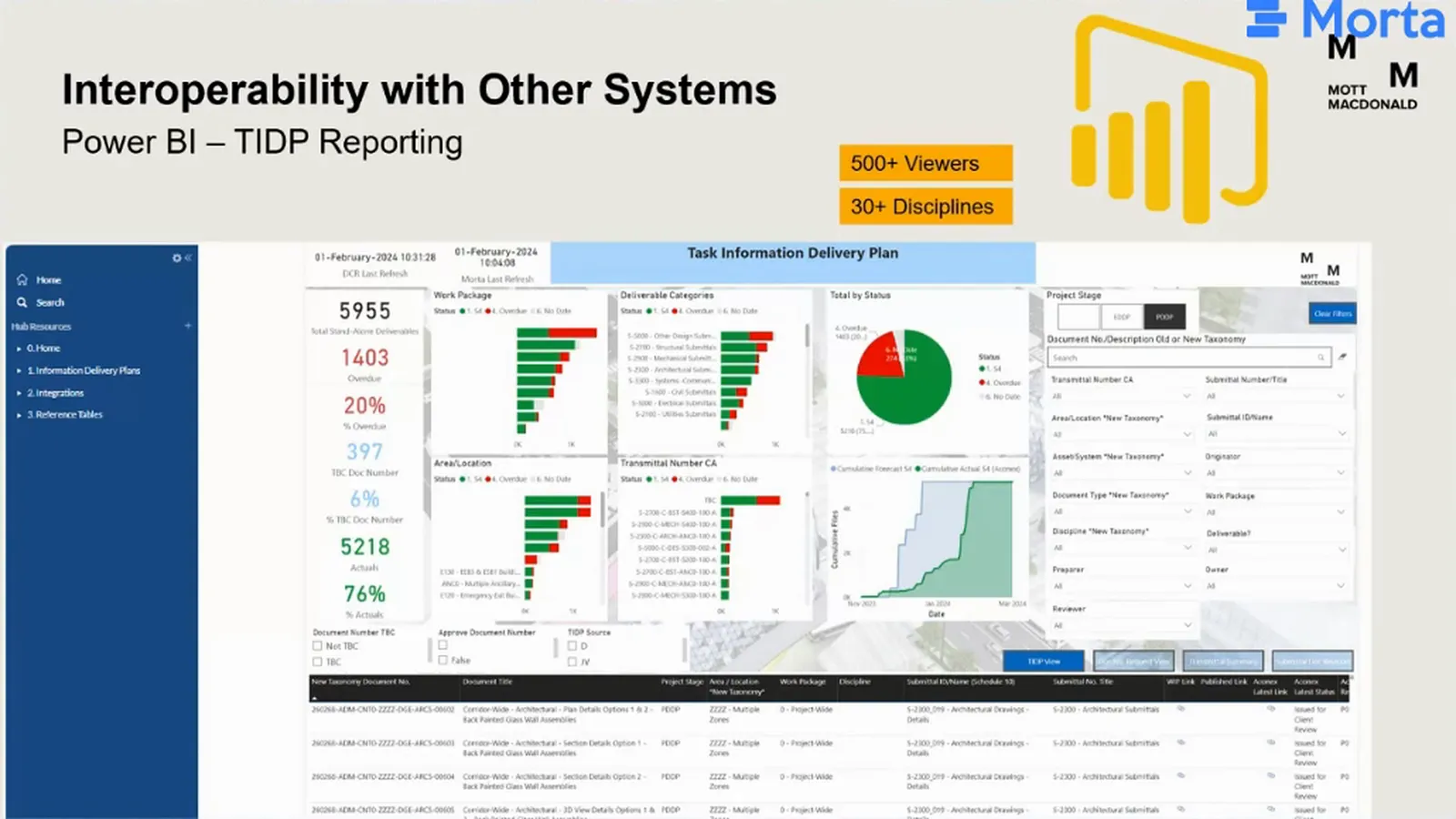
Power BI turned task information delivery plan data into a reporting view embedded in Morta. It became a daily resource for reviewing delivery progress and status across project stages. Mariano reported more than 500 viewers across over 30 design disciplines, extending the view of the plan beyond the people populating its tables.
Activity data answered two different questions
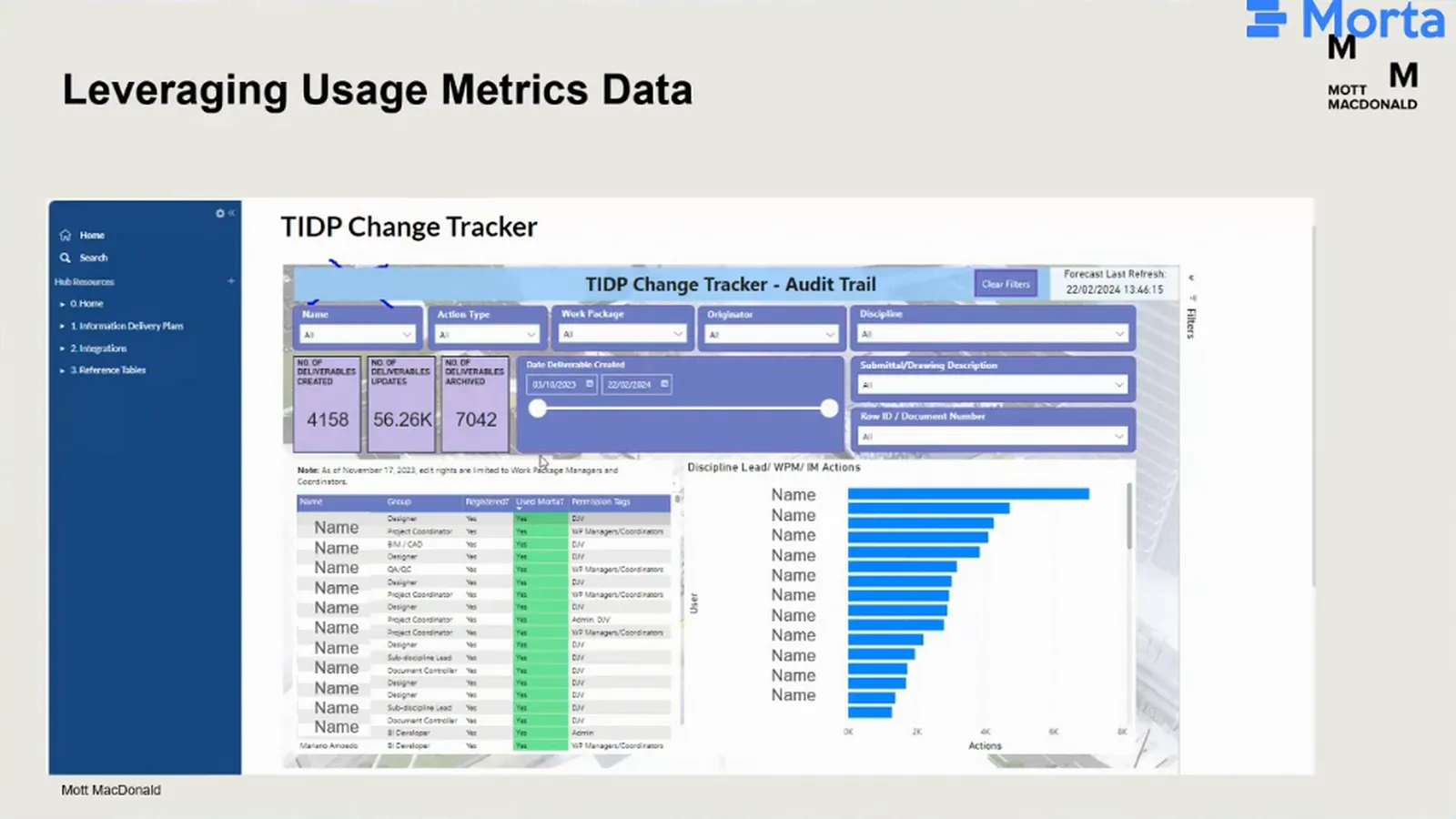
Registration and login did not tell the implementation team whether people were working in the plan. Mariano’s activity dashboard tracked the creation, update and archiving of deliverables. By joining that activity to task information delivery plan data, the team could filter it by user, discipline or work package and inspect where planning work was happening.
Change history also helped the team answer a specific support question. An author returned after several weeks and could no longer recognise a deliverable. The team filtered by the author’s name and the creation action, found the item, then opened its history on a separate dashboard page. They could identify who had changed it and explain the sequence: the deliverable was still there, but later edits had changed it.
Setup moved from months to weeks
Samuel put earlier MIDP setup at months and the pilot at weeks. The next aim was to reuse the configuration across projects, refine it and create a template. Setup in days was a future ambition for that template.
The challenge
The subway extension team had managed early design with Excel. As the project moved towards a phase expected to generate more than 10,000 deliverables, Mariano’s team needed a plan that could handle the volume and connect with the systems tracking the work.
Samuel had seen another problem on projects using Excel: too many people changed the structure, including adding unnecessary columns. Information management and project teams then had to lock down and repair the plan. Connecting those spreadsheets to common data environment (CDE) records also required more work than the automated connections on this project.
A bespoke application brought a different difficulty. On an earlier project, the team had developed a database and web application for MIDP management, but transferring it to other projects was hard. Samuel wanted an approach that retained control while allowing the team to configure the plan for another project.
The solution
Connect the plan to the work and its records
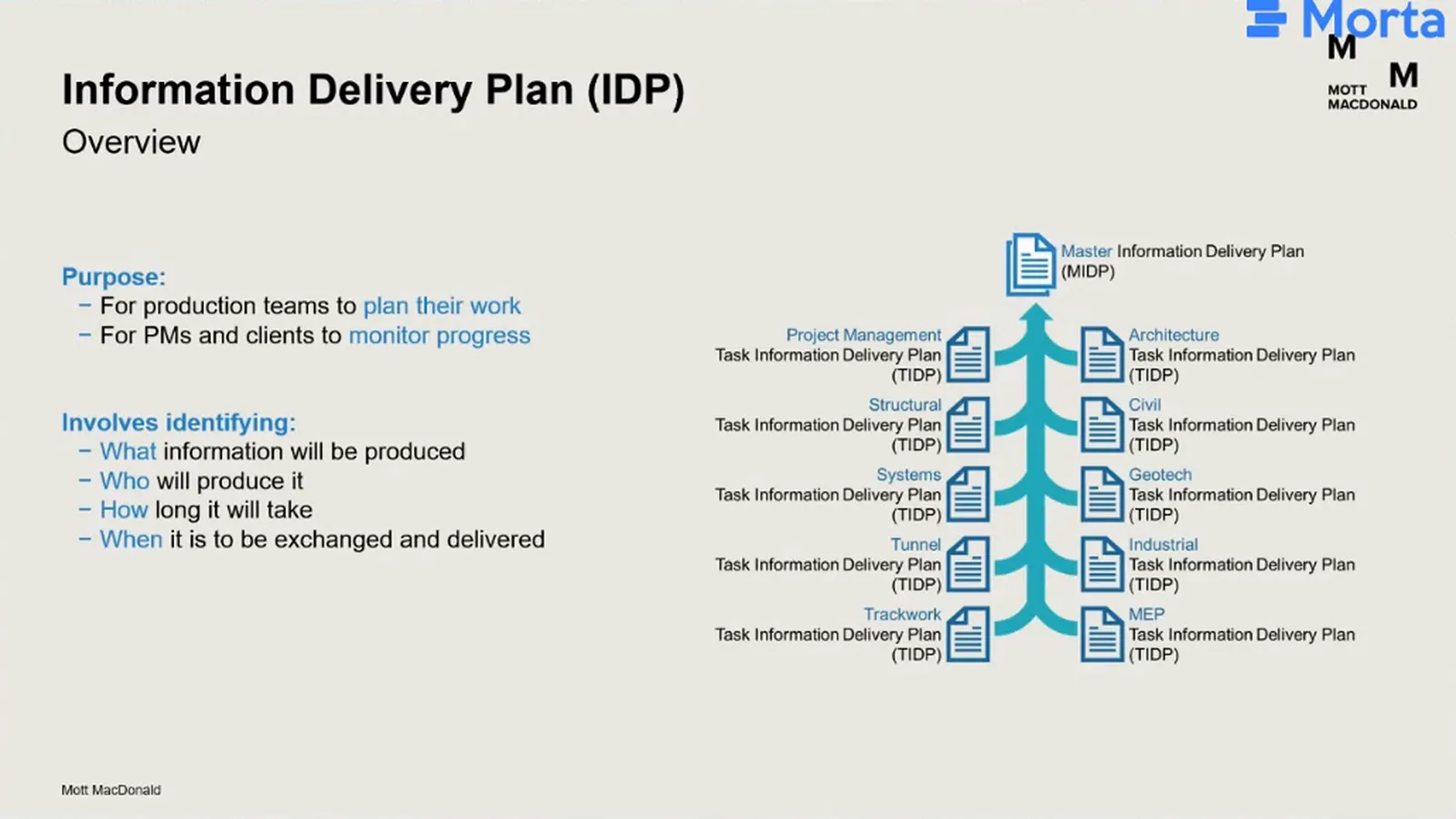
An information delivery plan identifies what information will be produced, who will produce it, how long it will take and when it will be delivered. Production teams use it to plan their work. Project managers and clients use it to monitor progress and plan when information will be available. Discipline-level task information delivery plans, or TIDPs, combine into the master information delivery plan, or MIDP.
Samuel’s wider architecture connected that plan to other project records through common identifiers. A programme ID linked planned work to expected dates, while a document number linked each deliverable to its common data environment, or CDE, status. Read together, the dates and status help project teams plan upcoming work and check how each deliverable is progressing. ProjectWise and Autodesk Construction Cloud were examples in this wider architecture.
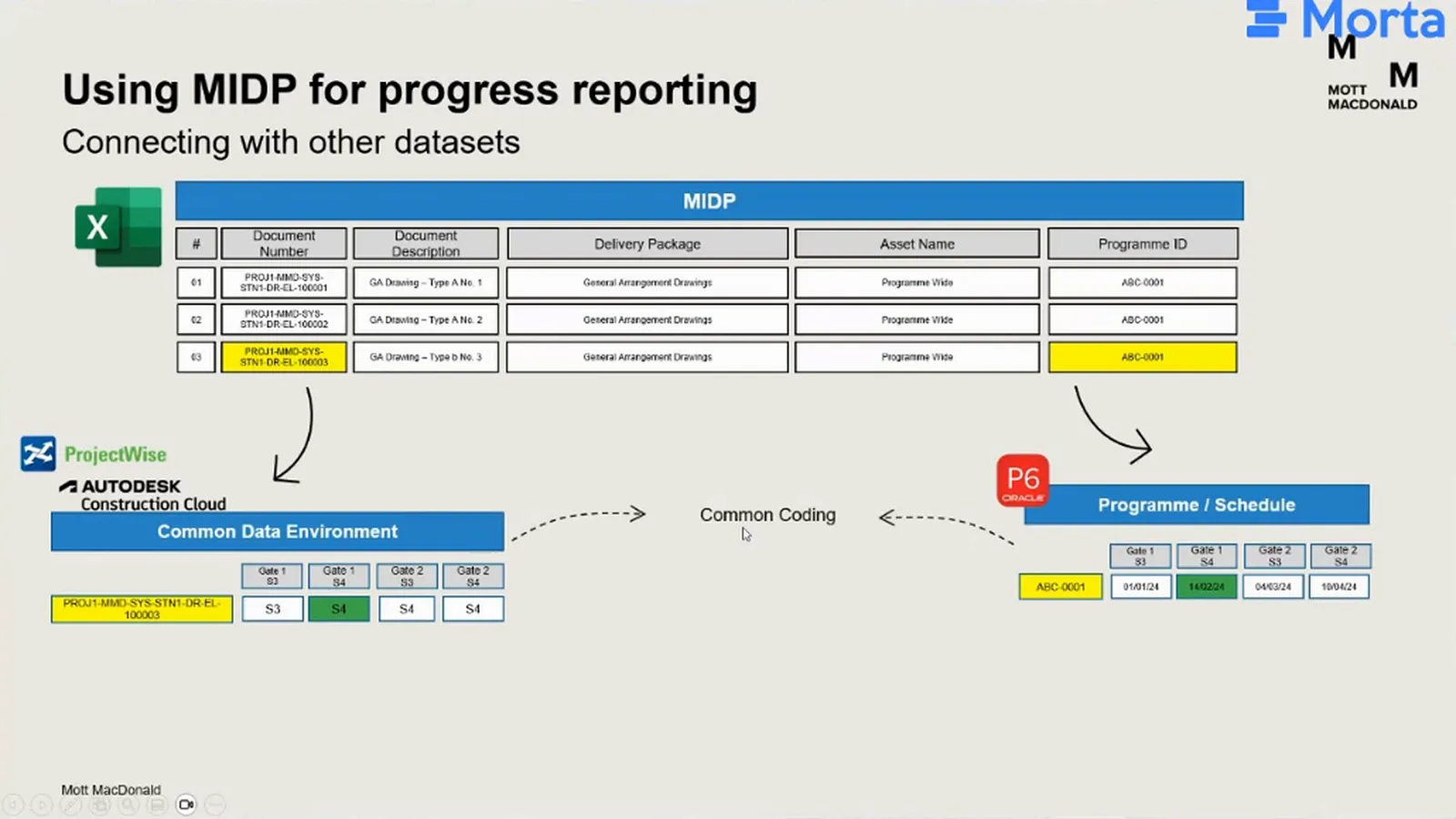
On the subway extension, the working-file and document-control connections were SharePoint and Aconex. A Power Automate flow brought SharePoint library metadata into Morta, where document numbers matched working files to the plan. The Aconex connection brought its document register into Morta and refreshed status daily. The project also had P6 data linked to a TIDP dashboard by a developer, although Mariano was not involved in the detailed implementation.
A configuration the next project could use
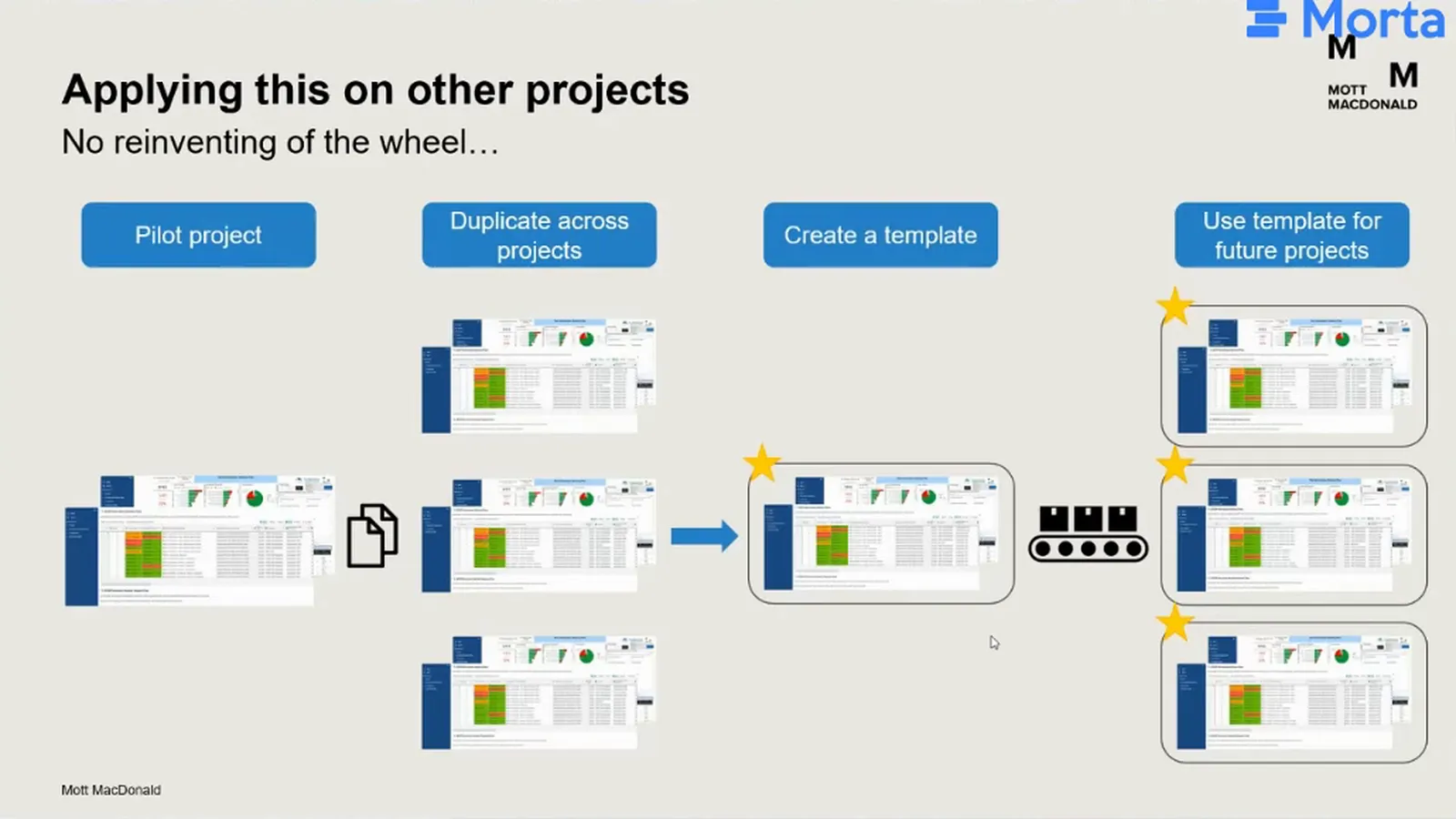
For Samuel, Morta sat between the familiar spreadsheet and the bespoke application. It gave the team control over the plan while allowing tables to be configured for different projects. The implementation team could adapt a configuration instead of building another project-specific application, making reuse part of the approach.
The implementation
Review before reservation
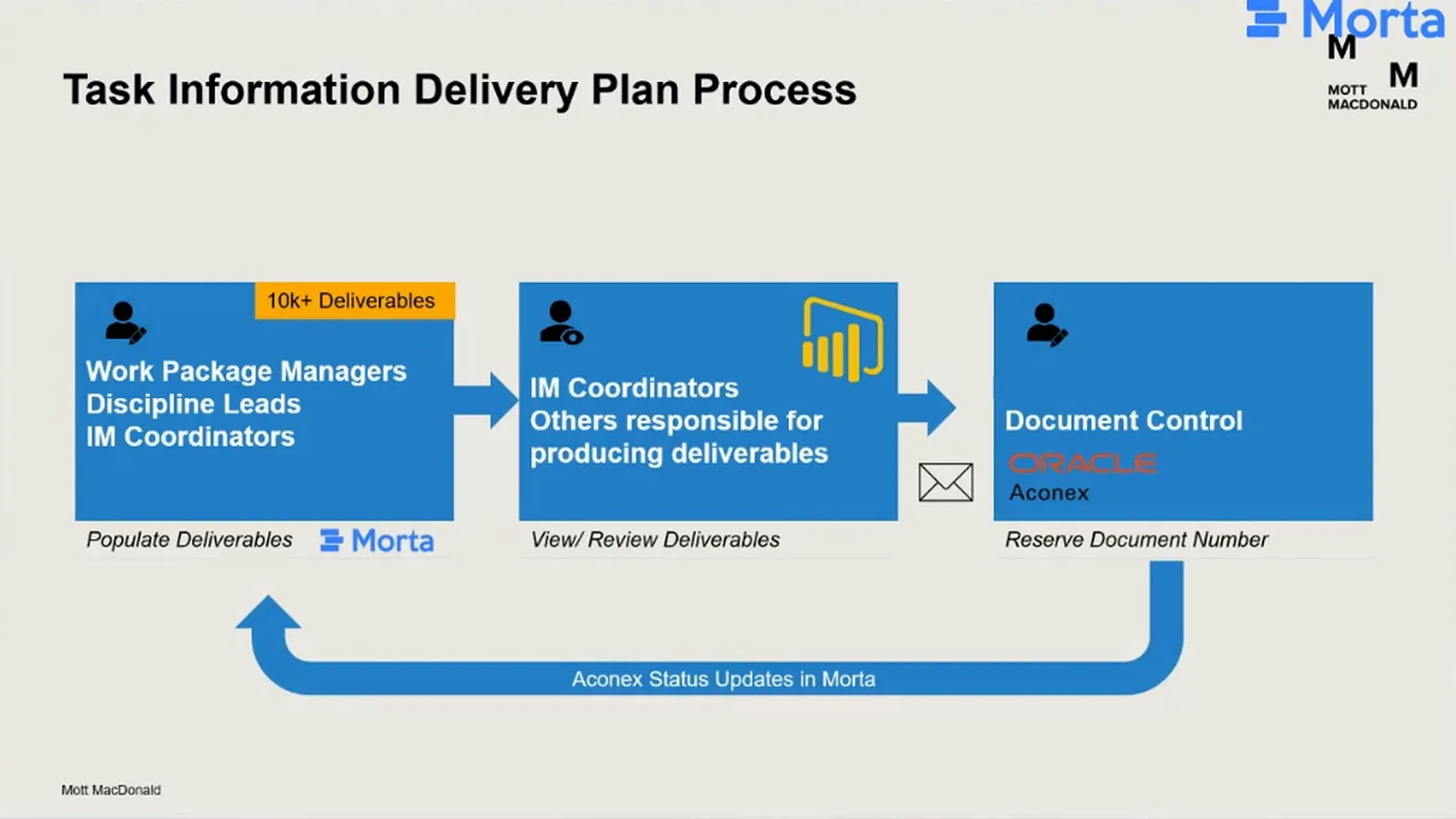
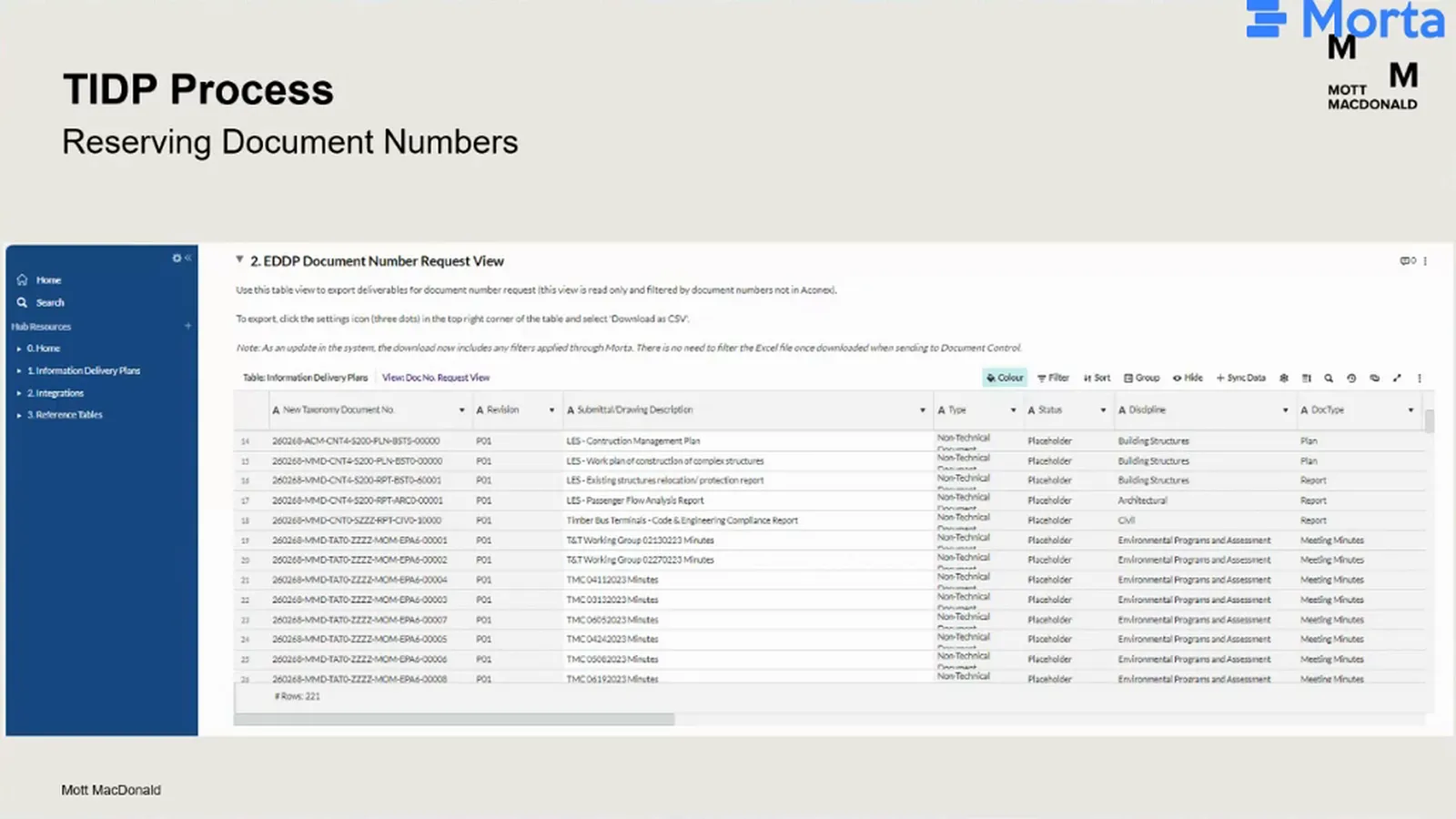
Work package managers, discipline leads and information management coordinators populated the deliverables in Morta. Coordinators and the people responsible for producing the deliverables reviewed them through the tables or Power BI. After that review, selected items were exported to document control for their document numbers to be reserved in Aconex. The handoff carried the reviewed selection, not every new entry in the plan.
Two table views supported those different jobs. The editable plan held deliverables, generated document numbers and the joined status columns. A separate read-only document-number request view let the team filter items for reservation and export that selection as a CSV. Document control used the exported numbers in Aconex.
Remove the duplicate status update
Document control initially had to update reservation status in Morta as well as work in Aconex. Automating the return of Aconex status removed that second entry. The team no longer needed to train document control to repeat the status update in Morta, because the plan received it from the system they already used.
Not everything that is being added into Morta is ready to be reserved in Aconex.
Mariano Amoedo
The outward handoff stayed manual because the design teams still needed to review their plans and select what was ready for reservation. Mariano wanted people to keep returning to the plan and dashboard as they became familiar with the workflow. Further automation was possible, but the team wanted to retain that review.
Support the people making the change
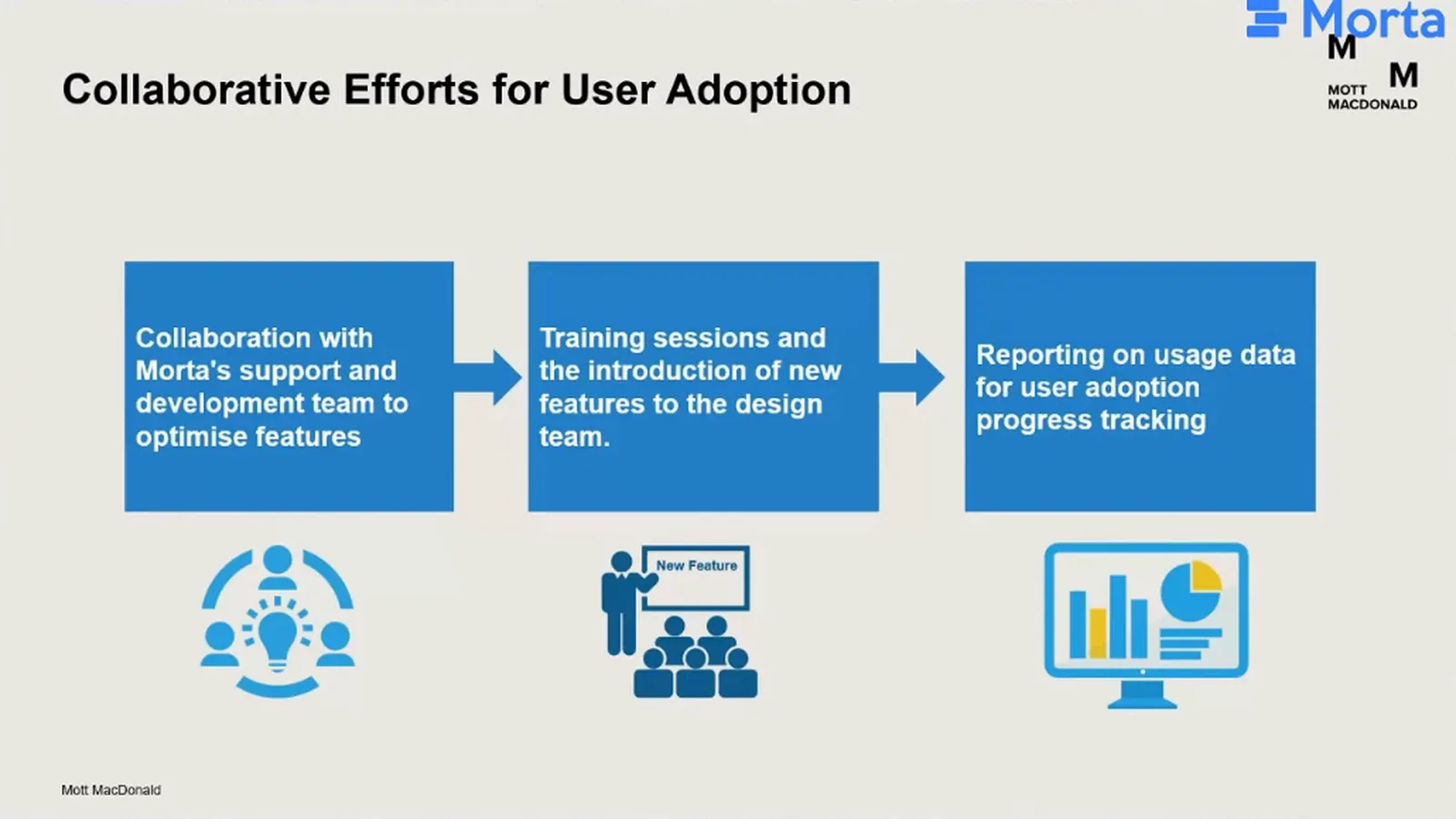
The first change was to help design teams work directly in Morta instead of sending Excel files for others to enter. Mariano’s team worked with Morta on features and ran weekly training sessions. These combined updates with hands-on guidance, giving users a regular opportunity to understand the workflow and raise concerns.
Usage reporting let the implementation team inspect whether that working pattern was taking hold. Engagement increased as new features and training continued. Samuel’s advice was to keep listening and responding to feedback throughout deployment: the technical setup was only one part of getting people to use a new plan.
Before and after
| Part of the work | Earlier approach | Project approach in March 2024 |
|---|---|---|
| Plan control | Excel suited early design, but the next phase brought a much larger volume. | Structured deliverables in Morta, with generated document numbers. |
| Delivery status | Status was held in the systems managing working files and document control. | SharePoint presence and Aconex status appeared beside planned deliverables. |
| Document control | Reservation status was entered in Morta as well as Aconex. | Aconex status returned automatically. Reviewed outbound selection stayed manual. |
| Understanding use and changes | Registration or login did not reveal substantive planning work. | Activity filters showed creation, update and archiving. Record history helped explain later edits. |
| MIDP setup | Samuel’s earlier setups took months. | The pilot took weeks. Template-based setup in days remained an ambition. |
About Mott MacDonald
Mott MacDonald is a global, employee-owned engineering, management and development consultancy. This story draws on Samuel and Mariano’s March 2024 presentation about information delivery planning on a North American subway extension project.
What’s next
Samuel’s next step was to duplicate the pilot across more projects, remove inefficiencies and adapt the configuration where needed. The team would then create a core MIDP template for future projects. He expected that sequence to bring setup down from weeks to days.
The team also wanted to develop the Aconex connection further. Automating more of the outward process would depend on preserving the review of deliverables before reservation.
Quantifying the benefits was still part of the pilot work. Samuel could point to better control, connected records and a configuration that could be reused, but the return-on-investment work was unfinished.
Explore information delivery planning with Morta
Talk to us about your information delivery planning workflow.
Integrations in this story
- SharePoint: working-file metadata connected to planned deliverables by document number.
- Power Automate: the flow carrying SharePoint library metadata into Morta.
- Aconex: document reservation and control, with status refreshed in Morta daily and a reviewed manual export for reservation requests.
- Power BI: TIDP and activity reporting, including a dashboard embedded in Morta.
Frequently asked questions
What is an information delivery plan?
It identifies the information a team will produce, who will produce it, how long it will take and when it will be exchanged or delivered. Teams use it to plan production, while project managers and clients use it to monitor progress. Task information delivery plans for different disciplines combine into the master plan.
Why did the team move beyond Excel?
Excel had worked in early design, but the next phase expected more than 10,000 deliverables. The team needed greater control and connections to delivery records. Samuel also wanted an approach that could be configured for another project, unlike the bespoke application used previously.
Was the Aconex workflow fully automated?
No. Aconex status returned automatically to Morta, but the team reviewed and selected deliverables before exporting them to document control for reservation. Newly added items were not automatically treated as ready.
How did the team check adoption?
The activity dashboard tracked creation, updates and archiving, rather than relying on registration or login. Joining activity to project data let the team inspect use by discipline, work package and user while training and feature development continued.
How did the project connect P6 data?
A dashboard developer linked P6 data with Morta data in the TIDP reporting. Mariano knew that the connection existed but did not know its implementation details. Samuel noted that the usual approach was to link a work package to a programme ID, rather than assign the link to each document.
Could teams export information for clients?
Export tools were available in Morta and the connected reporting tools. Mariano knew that teams used exports for different purposes, but he was not involved in their client-submission or audit processes and could not confirm how those worked.
How long did setup take?
Samuel compared previous MIDP setups taking months with weeks on the pilot. Setup in days was his expectation for a future reusable template.
Had the team quantified the return on investment?
Not yet. At the March 2024 session, Samuel said the team was still working on quantifiable benefits from the pilot.

