Babcock International
Babcock connected requirements held in Morta to Python and IfcOpenShell for repeated IFC checks. William Baker-Jones's comparison reduced processing for 404 model files from 128 hours to 13.4 hours, with some reporting steps still in development.
William Baker-Jones connected information requirements in Morta to Python and IfcOpenShell to check Babcock International’s IFC model data. The approach reduced processing time in his comparison while preserving the distinctions between what each project needed and when it needed it.
William Baker-Jones, then Deputy Head of BIM and Digital Engineering in Babcock International Group’s Major Infrastructure Projects division.
- 404 IFC model files: the scale of William’s comparison across the projects in his presentation.
- Approximately 19 to 2 minutes per model: manual Solibri checking compared with Python and IfcOpenShell using requirements from Morta.
- 128 to 13.4 hours for those 404 models: the processing durations shown in the same comparison.
Executive summary
Babcock needed to validate repeated model deliveries against the information it would use to operate and maintain assets. Requirements held in Morta supplied the criteria for Python and IfcOpenShell to check the models’ alphanumerical data. Project metadata selected the relevant requirements table, stage criteria determined which information was due, and model exclusions kept inapplicable files outside the checks. This connected faster processing to the information team’s actual task: identifying whether incoming asset data met the requirements for that project and stage.
The results
William put the processing time for 404 IFC models at 128 hours with the manual Solibri workflow and 13.4 hours with Python and IfcOpenShell using requirements from Morta. The latter took approximately two minutes per model in his comparison. Less time spent processing repeated deliveries would give the BIM and digital engineering team more time for documentation requirements and other information management work.
The challenge
At Devonport, Babcock was upgrading infrastructure used to maintain the Royal Navy’s submarine fleet. Model updates arrived roughly every two to three weeks. William’s manual checking cycle for 404 models took 128 hours, equivalent to 16 eight-hour working days. The team could reach the next model delivery before finishing the previous one.
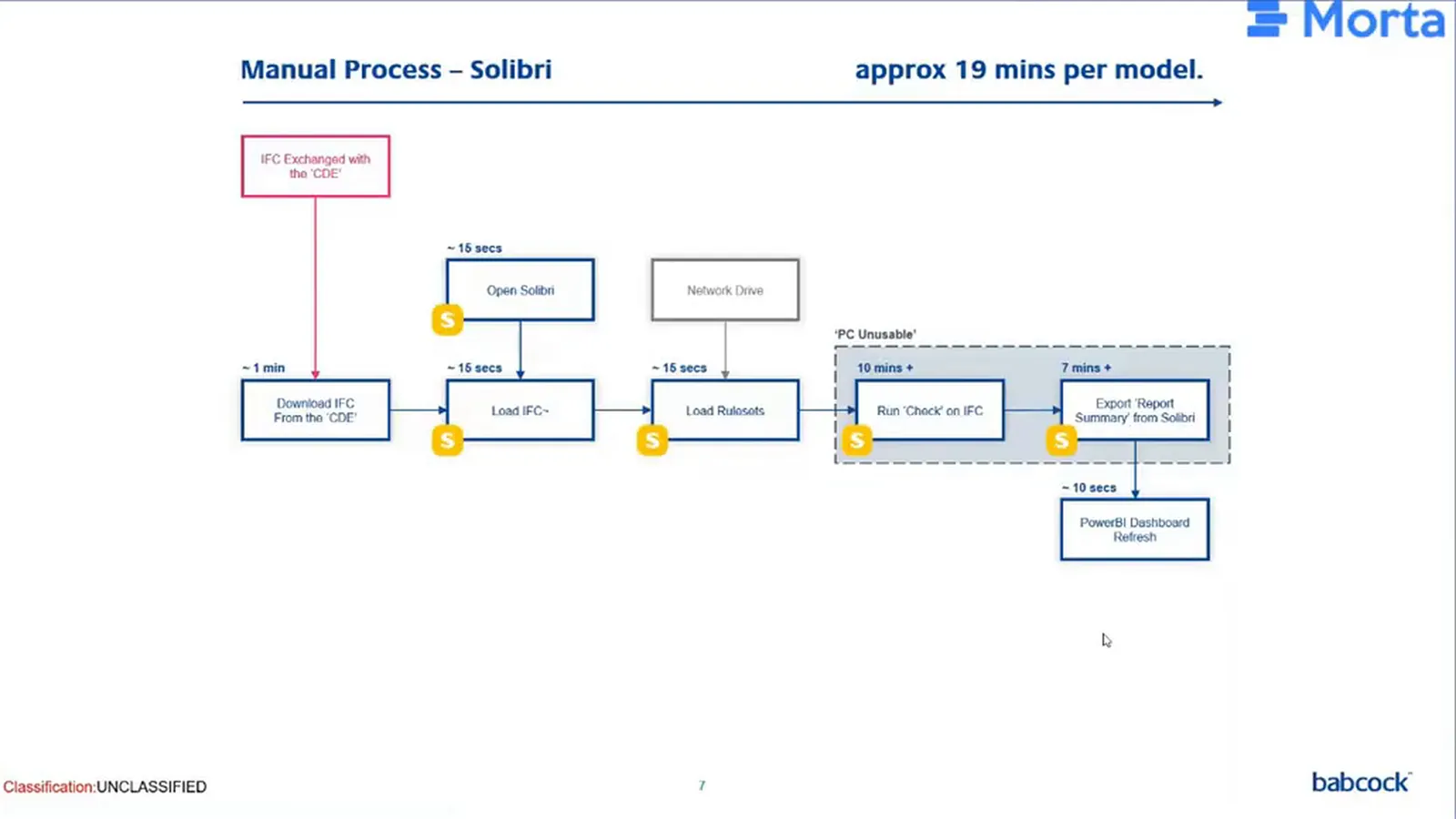
The process began with an engineer downloading an IFC file from the common data environment, opening Solibri, and loading the model and rule sets. Checking and exporting large models took time and could make the engineer’s workstation unusable for other work. William valued Solibri’s validation tools. The problem was the processing time and computing demand of this particular application.
The solution
The first improvement freed the workstation
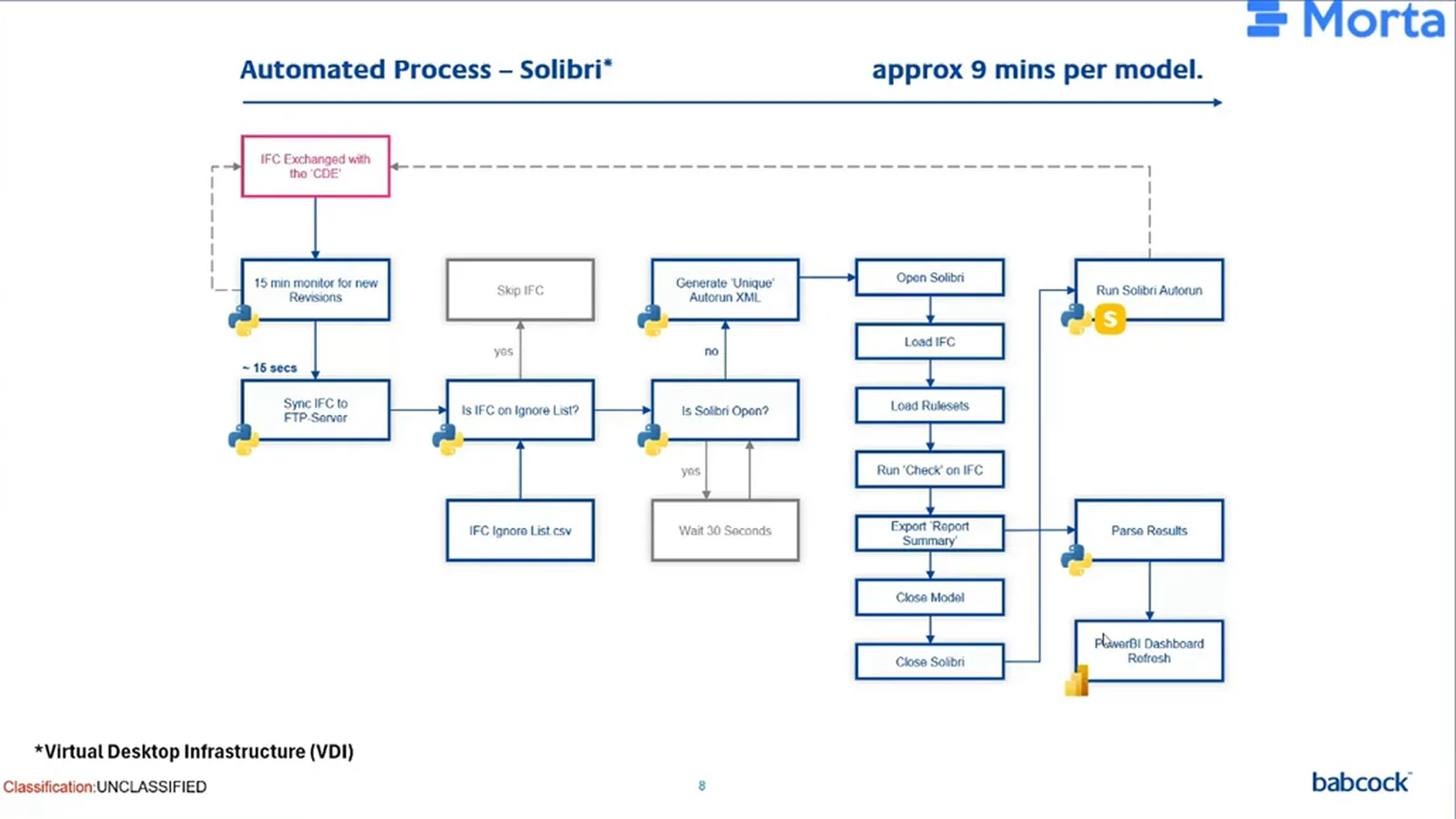
William had explored virtual desktop infrastructure in a previous organisation. Python downloaded models to a central repository, triggered Solibri’s Autorun checks on a virtual machine and exported results into Power BI. Engineers could start the process remotely, leave it running and continue their day-to-day work on their own machines.
The virtual machine could also run outside working hours. William recalled starting validation on a Friday evening and returning to checked models on Monday. He put the automated Solibri workflow at about nine minutes per model, but it still spent time opening the application, loading models and rule sets, exporting results and closing again.
Morta supplied the requirements for direct data checks
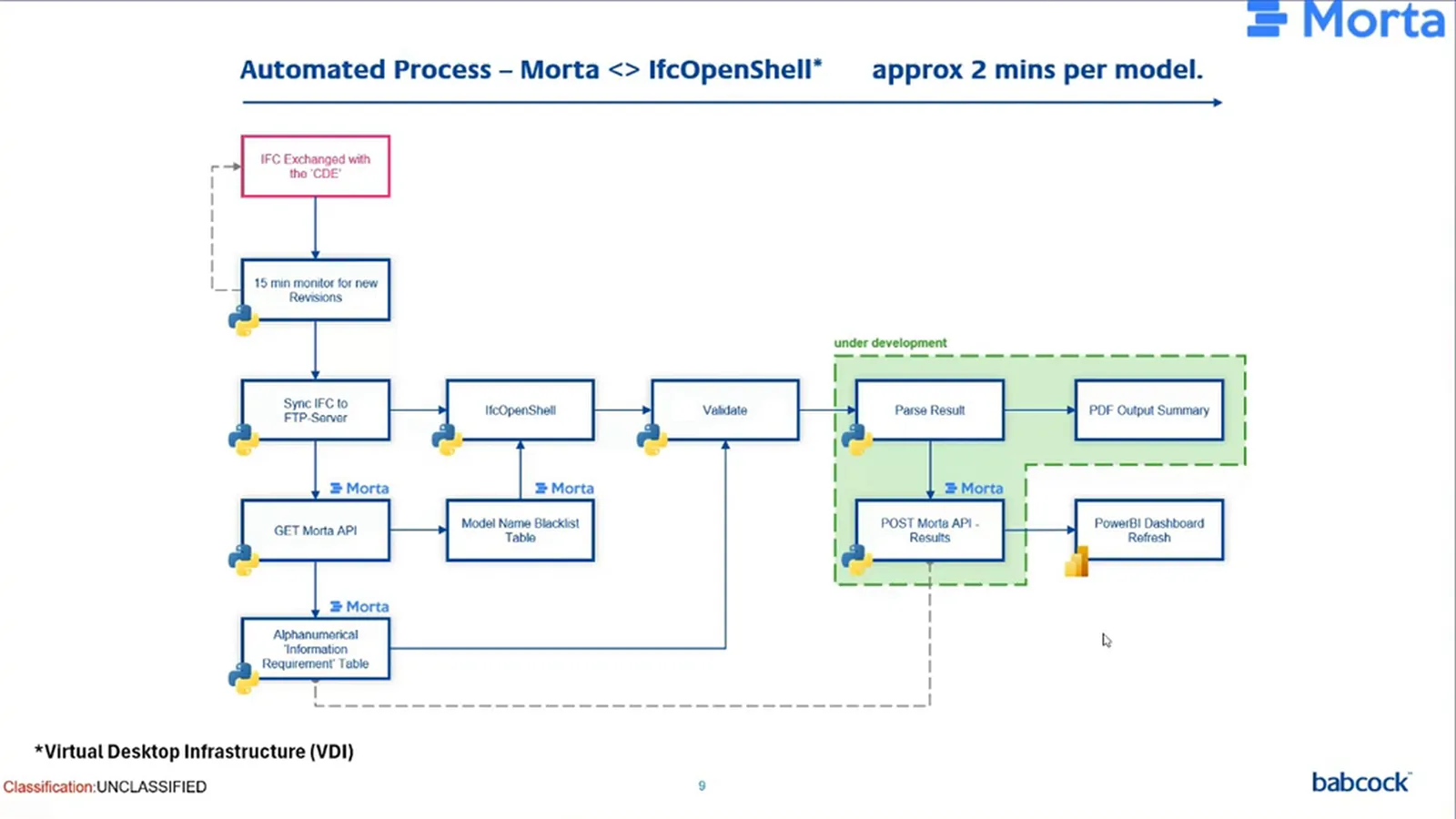
The next change removed those desktop-application steps from the alphanumerical checks. Morta held the information requirements in tables. Python retrieved them through Morta’s API, and IfcOpenShell gave the script access to the data within each IFC file. The information team could run the checks against those requirements without opening and closing Solibri for each model.
The implementation
Requirements reflect the operational need
Babcock was the client, operator and maintainer of the assets in William’s account. It specified the information and would later use it in asset management. The team therefore needed to check incoming model data against the requirements for those operational uses, including the data destined for its asset-management systems.
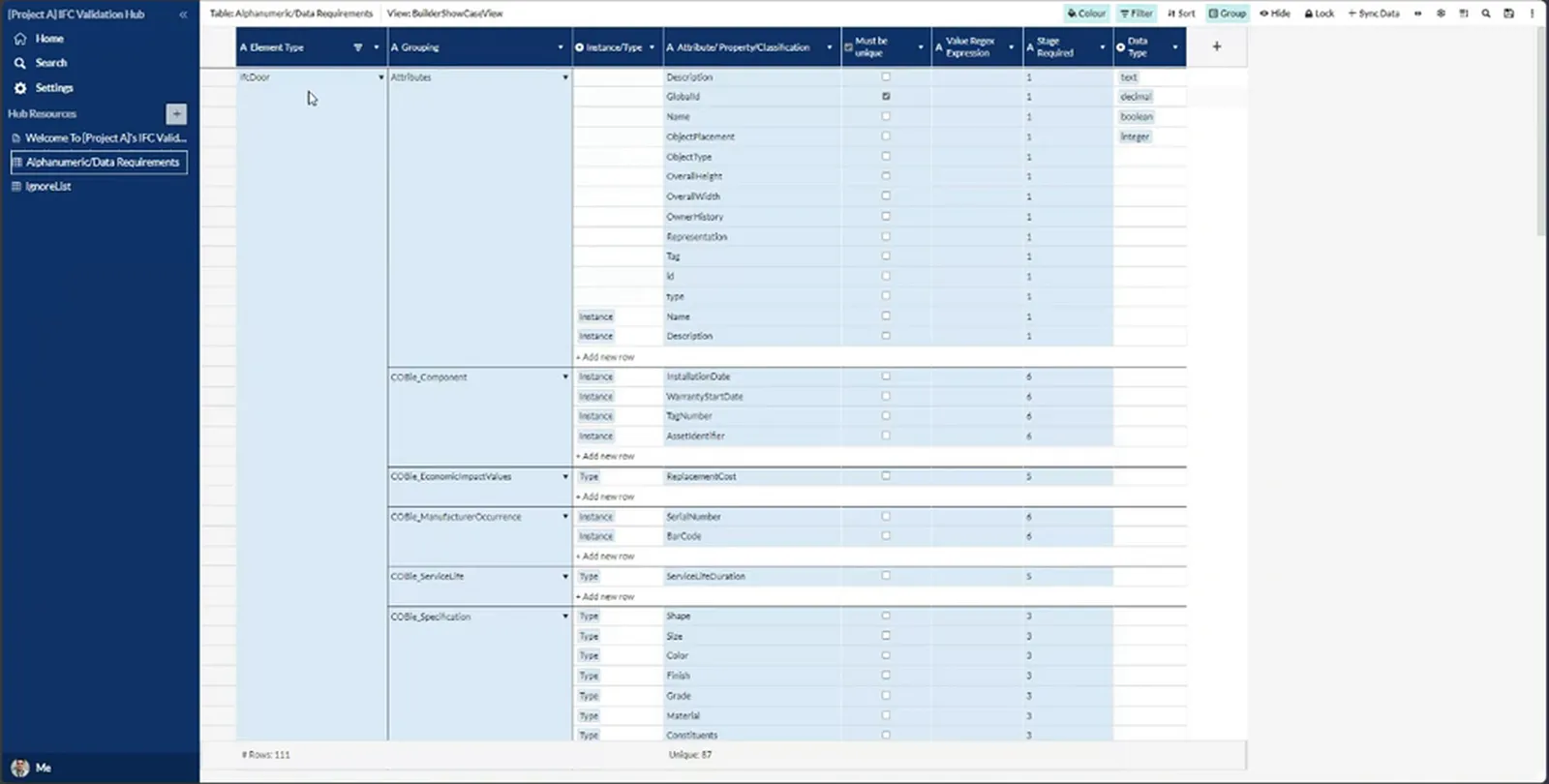
A central set of asset information requirements provided the starting point, with separate tables for individual projects. Not every project needed the same information. IFC metadata identified the project, allowing the Python script to fetch the corresponding table from Morta. The team could check each delivery against its own project’s requirements rather than generate failures against another project’s criteria.
The stage determines what is due
Information requirements change as a project progresses. Installation and warranty dates are needed towards the end of a project, not at its start. Required-stage fields and dates in Morta determined when the script should apply each requirement. This let the project team check the information due at that stage, then increase the checks as later deliverables became necessary.
A value must be present and meet its rule
The requirements table specified attributes and property sets. In William’s IfcDoor example, the script retrieved the relevant requirements, found the door in the IFC file and checked its values. It saved a pass or fail, then continued through the elements in the file. The information team could identify data that was missing or did not meet the specified requirement.
A populated field is not sufficient on its own. Regular expressions in Python checked value formats, such as the expected form of a classification code. This distinguished the presence of a value from its compliance with the required format.
The team also controlled which models needed these checks. William used temporary works and reinforcement models as examples of files that might be excluded. Exclusions maintained in Morta told the script which files to skip, keeping models outside an applicable asset-data requirement out of that validation run. His demonstration showed this selection and checking sequence using dummy models.
Make the results useful
Individual pass-or-fail results need to be read in context. William used an example Power BI dashboard to show how the team could filter results by project, originator, model and date, then examine issues by type, rule and IFC entity. These views let the information team see which requirements were failing in a selected delivery and compare issue counts over time.
The same organisation could supply information to several projects. Filtering by originator made it possible to examine that organisation’s results across the programme, as well as compare organisations. William used example data for the presentation because the underlying project information was sensitive.
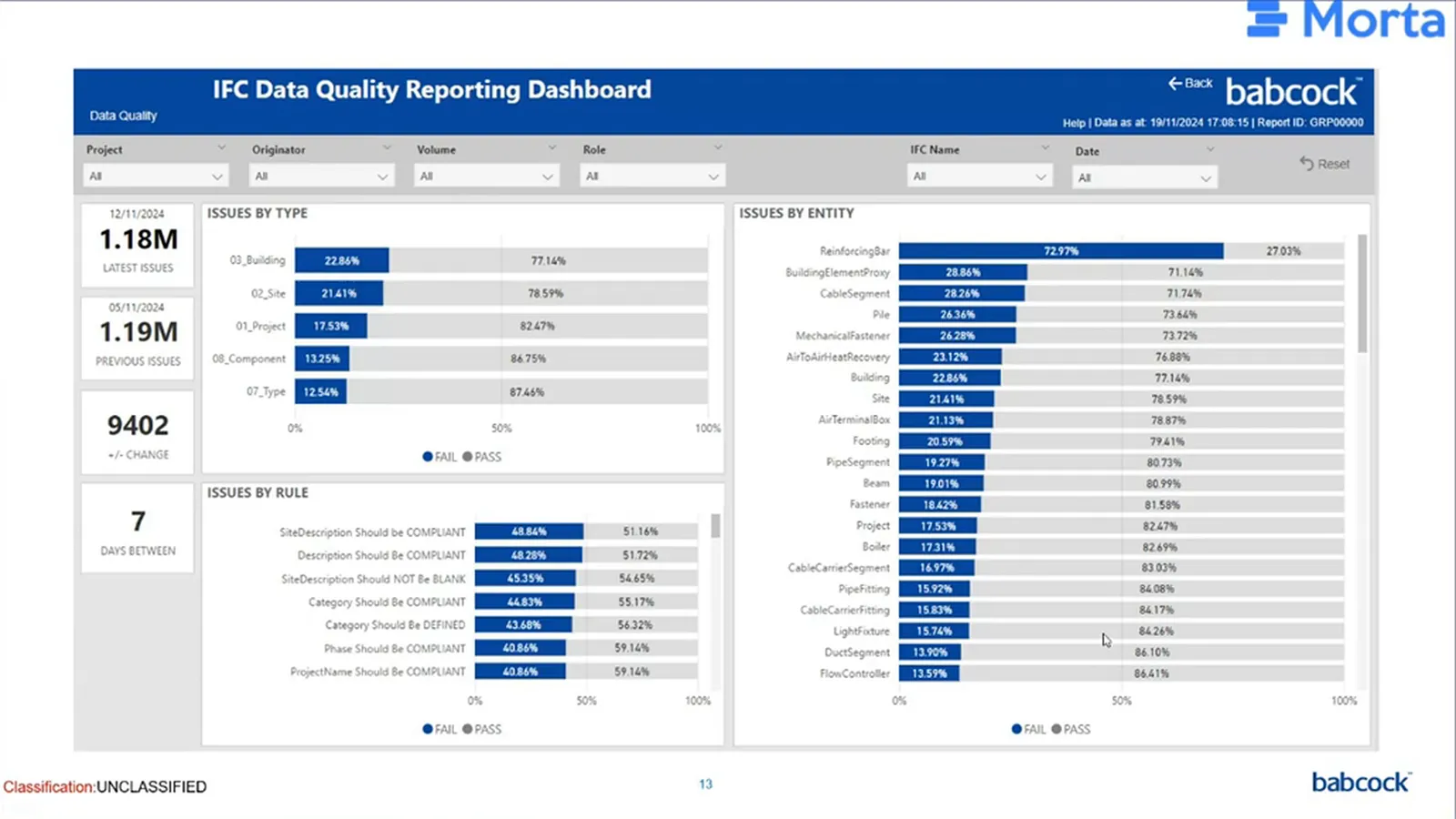
William’s wider reporting plan included email results for people without access to the Power BI dashboard. That would make the output available to reviewers through another route, alongside the dashboard’s more detailed views.
What’s next
William identified further applications for Python and IfcOpenShell around information delivery plans and checking information in the common data environment. Risk, opportunities, costs and security information requirements were areas for further work. The next step was to explore how the same approach could check those requirements, extending the information team’s attention beyond the model-data validation demonstrated here.

